
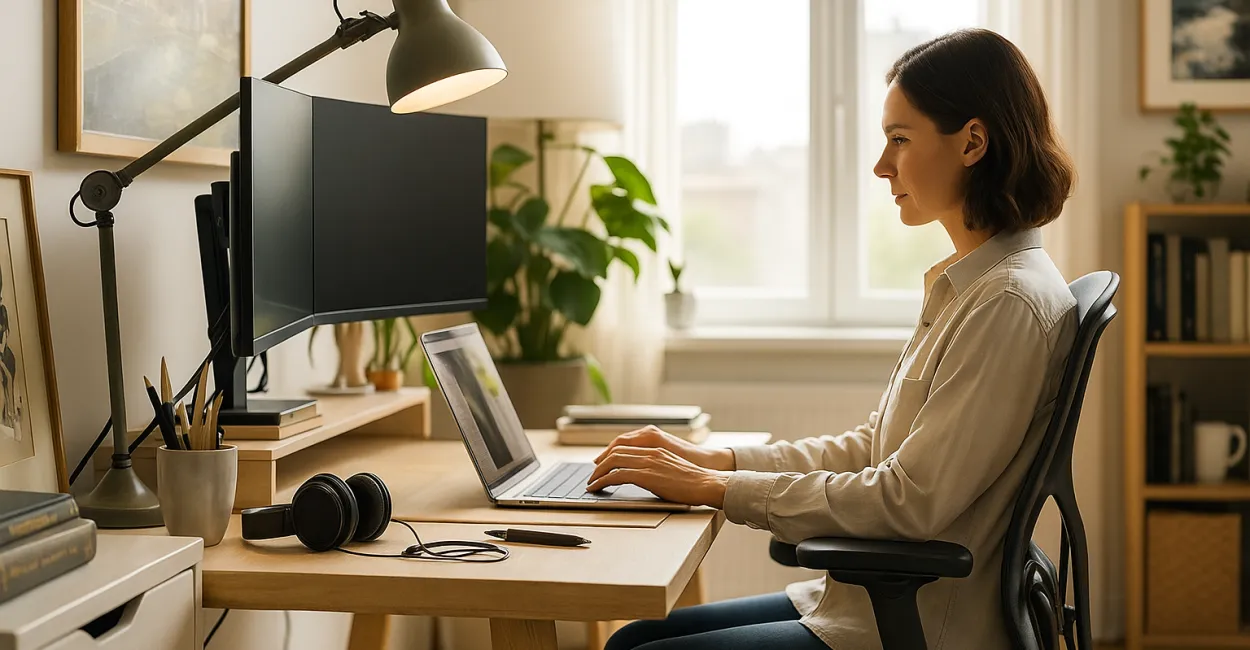
Working From Home: The Complete Guide to an Ideal Workspace
Working from home has become a reality for millions of workers around the world, transforming how we approach our daily work. But to make the experience productive and healthy, it’s essential to create a suitable workspace that meets the physical and psychological needs of remote workers.

Do you know what it takes to set up an efficient workspace at home? This complete guide explores every detail you need to make your home office functional, comfortable, and conducive to productivity.
What Is a Home Office, and Why Does It Matter Today?
Definition and Context of Working From Home
Working from home means doing your job at home or another location outside a traditional office, using technology to maintain communication and productivity. This way of working gained momentum with the rise of digital technology and, more recently, the global pandemic, which accelerated its adoption.
A well-equipped home office offers greater scheduling flexibility and saves commuting time. It can also make it easier to balance your personal and professional life.
However, a poorly designed workspace can cause problems such as distractions and lower productivity.
Benefits and Challenges of Remote Work
The benefits of working from home include the freedom to organize your routine, lower transportation and meal costs, and the ability to personalize your workspace to suit your preferences.
On the other hand, challenges include staying disciplined, avoiding social isolation, and preventing ergonomic problems caused by poor posture or unsuitable furniture.
Understanding these factors is essential to creating a space that minimizes the downsides.
How Your Workspace Affects Productivity
A well-designed workspace directly affects your concentration, motivation, and health. Proper lighting, ergonomics, and organization all have a positive impact on the quality of your work at home.
A pleasant workspace can also reduce stress and improve well-being, which can boost your day-to-day performance.
Creating an ideal workspace is therefore an essential step toward succeeding at remote work.
- Flexible schedule
- Lower costs
- Freedom to organize your work
- Ability to personalize your workspace
- Challenges with discipline and isolation
Planning Your Workspace: How to Choose the Ideal Spot for Your Home Office
What to Consider When Choosing a Workspace
When choosing a spot for your home office, consider factors such as how quiet it is, how close it is to natural light, and how easily you can access the equipment you need.
Avoiding high-traffic areas of your home can help reduce distractions and unwanted noise.
A private space, even a small one, can be more effective than a larger area where you’re constantly interrupted.
Natural and Artificial Lighting
Lighting is essential for eye health and your mood at work. Set up your desk near a window to take advantage of natural light, which is not only free but also helps maintain your circadian rhythm.
Supplement it with quality lamps that don’t cause glare or shadows, especially at night or on cloudy days.
Choose bulbs with a color temperature between 4000K and 6000K to create cool white light that supports concentration.
Organization and Room for Equipment
Plan your layout so you have enough room for your computer, peripherals, office supplies, and any printed documents.
Shelves, drawers, and organizers keep your workspace tidy and functional, saving you time searching for things.
Keep cables organized to prevent accidents and make equipment maintenance easier.
Home Office Ergonomics: Essential Tips for Your Health

The Importance of Good Posture
Maintaining good posture helps prevent muscle pain, fatigue, and repetitive strain injuries. Your chair should provide lumbar support, and your feet should rest flat on the floor or on a footrest.
Position your monitor at eye level to avoid straining your neck, and keep your shoulders relaxed while using the keyboard.
Taking short stretching breaks can help reduce the effects of a sedentary lifestyle.
Choosing Ergonomic Furniture
Invest in an adjustable chair, a desk at the right height, and a laptop stand if needed. Although the upfront cost may be higher, ergonomic furniture can help prevent health problems and improve performance over time.
Avoid working on sofas or beds, which don’t provide proper support.
There are affordable options that offer both comfort and value.
Exercise and Regular Breaks
Taking regular movement breaks is essential for circulation and muscle relaxation. Simple stretches for your neck, shoulders, and wrists are recommended.
Apps and techniques such as the Pomodoro method can help you stick to these healthy breaks.
Making these habits part of your routine can prevent chronic problems and improve your energy.
- Good posture helps prevent pain
- Ergonomic furniture is an investment
- Exercise breaks reduce fatigue
- Keep your monitor at eye level
- Keep your feet flat on the floor
Technology and Connectivity: Essential Home Office Equipment
Recommended Computers and Peripherals
Choose a computer that can handle your workload, whether it’s a desktop or a laptop. Invest in an ergonomic keyboard and mouse to help prevent injuries.
External monitors expand your workspace and make multitasking easier.
Noise-canceling headphones can help you concentrate in noisy environments.
Reliable Internet and Security
A fast, stable internet connection is essential for video calls and remote access. Check your internet plan’s speed, and consider using an Ethernet cable for a more reliable connection.
Use secure networks and consider a VPN to protect sensitive data.
Protect your devices with up-to-date antivirus software and strong passwords.
Productivity Software and Tools
Office suites, communication apps, and task management platforms are essential tools. Choose versions that are compatible with your operating system and meet your specific needs.
Popular platforms include Microsoft Office, Google Workspace, and Slack.
Learn to use these tools effectively to boost your productivity.
Creating the Right Atmosphere: How to Make Your Home Office Comfortable and Inspiring
Decor and Personal Style
Adding decorative touches that reflect your personality can make your workspace feel more welcoming. Plants, artwork, and personal items can improve well-being and help reduce stress.
Avoid adding too many items, which can make the space feel visually cluttered.
Light, neutral colors support concentration and make a room feel more spacious.
Noise Control
Outside noise can interfere with concentration. Consider soundproofing measures, such as sealing doors and windows, and use headphones when needed.
Turning off unnecessary notifications can also help you focus.
In some cases, gentle background sounds, such as instrumental music, can be helpful.
Temperature and Ventilation
Keep your workspace well ventilated and at a comfortable temperature to avoid discomfort. Use fans, air conditioning, or heaters as appropriate for the season.
Stuffy or overly cold spaces can hurt productivity.
Plants can also improve air quality and make a room feel fresher.
- Personalized decor makes your workspace more comfortable
- Reduce noise to improve concentration
- Keep the temperature comfortable
- Use light colors to make the space feel larger
- Plants make your workspace more inviting
Time Management and Routines When Working From Home
Set a Regular Schedule
Setting clear start times, breaks, and end times can help you stay disciplined and separate your personal life from work. This helps prevent overwork and improves the quality of your rest.
Use alarms or apps to stay on schedule.
Letting family members know your work hours can help minimize interruptions.
Organizing Tasks and Priorities
Make daily and weekly task lists, prioritizing the most important items. Digital tools make it easier to stay organized and keep track of deadlines and goals.
Breaking large tasks into smaller steps makes them more manageable.
Reviewing your plan at the end of the day lets you make adjustments for the next day.
Avoiding Procrastination and Distractions
Identify and minimize your main sources of distraction, such as social media or TV. Techniques such as the Pomodoro method, which alternates periods of focused work and rest, can help you stay productive.
Create a workspace free of temptations to strengthen your focus.
Recognize your limits and reward yourself for progress to stay motivated.
Comparing Home Office Equipment
| Equipment | Advantages | Disadvantages |
|---|---|---|
| Ergonomic Chair | Lumbar support, adjustable, and comfortable for long hours | High upfront cost, takes up space |
| External Monitor | Expands your workspace, improves productivity | Requires extra space, adds to the cost |
| Ergonomic Keyboard and Mouse | Reduce fatigue and injuries, improve posture | More expensive than basic models |
| Noise-Canceling Headphones | Block out noise, improve concentration | Can be uncomfortable during extended use, expensive |
| Desk Lamp | Provides focused lighting, protects your eyesight | Uses electricity, may take up desk space |
Mental Health When Working From Home: Strategies for Well-Being
Recognizing Signs of Stress
Remote work can increase feelings of isolation and anxiety. It’s important to recognize symptoms such as irritability, excessive fatigue, and difficulty sleeping.
Seeking professional help when needed is essential for maintaining your mental health.
Staying in regular contact with colleagues and friends can help reduce these effects.
Separating Work and Leisure Spaces
Avoiding spaces meant for relaxation can help create mental boundaries between work and personal life.
Having a dedicated home office helps reinforce this separation and improve focus.
At the end of the workday, turn off your equipment and tidy your workspace to signal that work is over.
Relaxation and Mindfulness Practices
Incorporating breathing techniques, meditation, or mindful breaks into your day can reduce stress and improve focus.
Mindfulness apps offer guided sessions and exercises that you can add to your routine.
These practices can help regulate emotions and boost productivity.
Communication and Collaboration When Working From Home
Tools for Effective Communication
Platforms such as Zoom, Microsoft Teams, and Google Meet are essential for meetings and real-time communication.
Choose tools that combine chat, video conferencing, and file sharing to make it easier to share information.
Training on how to use these tools can improve collaboration.
Establishing Regular Feedback Routines
Scheduling regular feedback sessions can prevent miscommunication and keep the team aligned with its goals.
Constructive feedback supports individual and team growth.
Use weekly meetings or reports to make this process part of your routine.
Maintaining Team Spirit
Hosting informal virtual get-togethers and social activities can strengthen relationships and reduce feelings of isolation.
Sharing wins and celebrating milestones helps motivate team members.
Open and respectful communication is the foundation of a collaborative work environment.
- Use integrated tools
- Provide regular feedback
- Host informal online get-togethers
- Encourage transparent communication
- Foster a collaborative culture
Information Security When Working From Home
Practices for Protecting Data
Use strong passwords and two-factor authentication to access systems and documents.
Avoid sharing confidential information over public or unsecured networks.
Back up your data regularly to prevent data loss.
Secure Equipment and Software
Keep your antivirus software up to date and install only official, trusted software.
Set up firewalls and restrict access permissions as needed.
Update your operating systems to fix vulnerabilities.
Guidelines for Remote Employees
Provide training on digital security and best practices for using devices.
Set clear policies for the use of personal and company equipment.
Encourage employees to report security incidents immediately.
Productivity and Motivation When Working From Home
Setting Realistic, Measurable Goals
Setting clear goals makes it easier to track your progress and stay focused on what really matters.
Use metrics to measure results and adjust your approach.
Achieving goals creates a sense of accomplishment and motivation.
Creating Positive Daily Rituals
Starting your day with a routine that includes organizing your workspace and planning your day helps you prepare for productive work.
Making time for breaks, meals, and exercise helps you stay balanced.
Rituals help build healthy, structured habits.
Recognizing Your Limits and Celebrating Wins
Avoid overworking to prevent burnout. Learn to recognize when it’s time to rest and disconnect.
Celebrate small wins to maintain your enthusiasm and confidence.
Finding a balance between effort and reward is essential for making remote work sustainable.
Labor Laws and Employee Rights When Working From Home
Understanding Current Regulations
Remote work is regulated by labor laws, which define the rights and responsibilities of employers and employees.
Familiarizing yourself with collective bargaining agreements and specific contracts can help avoid conflicts.
Contacting Brazil’s Ministry of Labor and Employment (Ministério do Trabalho e Emprego) is recommended if you have questions.
Work Hours and Rest Periods
Even when working from home, work hours must be tracked, with breaks and limits on working hours observed.
Digital tools can be used to record work hours.
Employers must ensure that these rules can be followed.
Work Equipment and Expenses
Employers are responsible for providing or reimbursing the costs of equipment and infrastructure needed for a home office.
Clear discussions can prevent misunderstandings about expenses and maintenance.
Putting agreements in writing is recommended.
How to Evaluate and Continuously Improve Your Home Office
Self-Assessments and Feedback
Regularly reflect on your productivity, comfort, and satisfaction with your workspace.
Ask colleagues and managers for feedback to identify areas for improvement.
Establish a continuous improvement cycle to optimize your home office.
Investing in Updates
Update your equipment and software as new needs arise to maintain efficiency and security.
Take courses and training to improve your digital skills and time management.
Also invest in ergonomic improvements and workspace upgrades for greater comfort.
Adapting to Change
Be open to adjusting your routine and workspace as projects, teams, or personal preferences change.
Flexibility is one of the benefits of working from home, as long as it’s managed with discipline.
Adopt new technologies and practices to stay competitive and satisfied.
Conclusion
Creating a suitable home office is essential for productivity, health, and balance when working remotely. From choosing a workspace to ergonomics, technology, and time management, every aspect should be considered as part of a whole.
By investing in a functional and comfortable workspace, you can support your well-being and professional performance. Share this guide with colleagues who also want to improve their home offices, and leave a comment below with your experiences and tips to keep the conversation going.
Frequently Asked Questions
What do you need for an efficient home office?
Choosing a quiet space, investing in ergonomic furniture, ensuring good lighting, and having the right technology are essential for an efficient home office.
How can you avoid health problems when working from home?
Maintaining good posture, using an ergonomic chair, taking stretching breaks, and exercising regularly can help prevent health problems.
Which digital tools can boost productivity when working from home?
Platforms such as Microsoft Teams, Google Workspace, Trello, and Zoom make communication, organization, and collaboration easier.
How can you separate work and leisure when working from home?
Use a dedicated workspace, set regular work hours, and turn off your equipment at the end of the workday to establish clear boundaries.
What labor rights do remote employees have?
Employees are entitled to work-hour tracking, reimbursement for work-related expenses, and suitable working conditions under current legislation.
Artigos Relacionados
 Working From Home: The Complete Guide to an Ideal Workspace
 School Bullying: A Complete, Practical Guide
 Automated Learning Tools: A Complete Guide to Better Learning
 Understanding Item Response Theory: A Complete, Detailed Guide
 Physical Education Teacher: A Complete Guide to Training and Career Paths
 Film Director: A Complete Guide to Starting Your Career in Film
